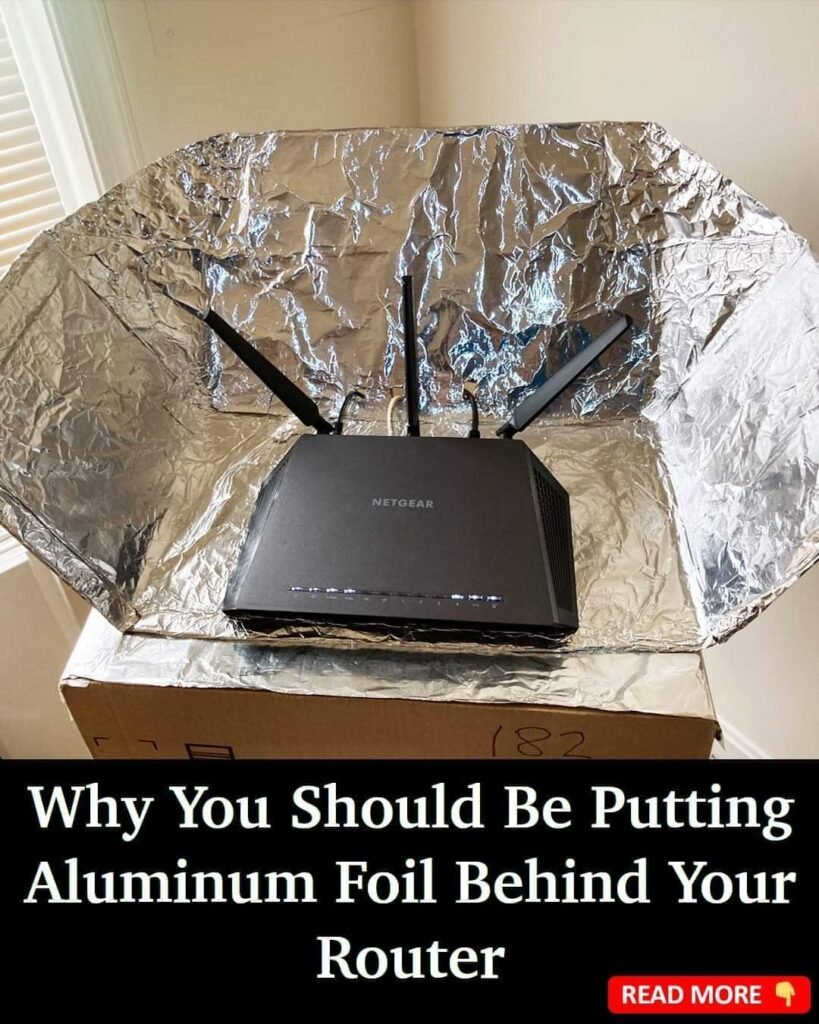
Anyone who’s struggled with spotty Wi-Fi has probably tried quick fixes — moving the router, switching channels, even rearranging furniture. But one of the most curious “hacks” floating around is simple: placing aluminum foil behind your Wi-Fi router to boost the signal.
At first glance, it sounds almost too home-hacky to be real. But when you break it down, there is physics behind the idea — let’s explore what’s realistic, what’s myth, and what’s worth trying in your own home.
The Basic Idea: Reflecting Radio Waves
Wi-Fi signals are a type of radio wave that travels through the air. Like light, these waves can reflect off surfaces — sometimes constructively, sometimes destructively.
Here’s the concept behind the foil trick:
- Aluminum foil can act as a reflector
- The foil can redirect Wi-Fi waves
- This can change where and how strongly the signal travels
In essence, the foil acts kind of like a mirror for wireless signals. But the real impact depends on how it’s used.
Why People Tried This Trick in the First Place
The story goes like this:
- Place a piece of aluminum foil behind your router
- Shape it like a curve or a reflector
- Redirect Wi-Fi signals toward a dead spot
The theory:
Since aluminum is conductive, it can bounce radio waves in a preferred direction — strengthening the signal where you want it.
This approach is loosely similar to how some high-end antennas use reflectors.
But before you start wrapping your router in tin foil, here’s what you should understand.
What Works — and What Doesn’t
What Can Be Legitimate
🟡 Redirecting Signals
If you consistently have dead zones (like a far-off room or corner), a directional reflector can help focus the energy that way — instead of letting the signal dissipate evenly in all directions.
🟡 Ceiling vs. Wall Reflection
Router placement near open space is usually best. A reflector can sometimes help if the router is boxed in near thick walls.
🟡 Signal Path Matters
In a large open room, a small reflector won’t make much difference. But in tricky floor plans with walls and obstacles, redirecting signal paths can help a little.
What Likely Won’t Help
❌ Wrapping the Entire Router
Completely covering the router or antennas with foil can block signals rather than enhance them.
❌ Haphazard Foil Shapes
Just sticking a sheet behind the router without thinking about direction — that won’t produce predictable results.
❌ Expecting Huge Gains
Even in the best cases, DIY reflectors usually produce modest improvements, not drastic signal leaps.
How Radio Waves React to Metal
Here’s where the physics gets practical:
- Metal surfaces reflect radio waves, but the effect depends on the shape, angle, and distance.
- A parabolic (curved) reflector works better than a flat sheet for focusing waves.
- Aluminum foil alone is a poor structural reflector if it’s just crumpled or flat against the wall.
So the hack only has potential if you use the foil as a reflector with a purposeful shape.
How to Try It Correctly
If you want to experiment, here’s a better way:
🧠 Make a DIY Signal Reflector
- Take a piece of cardboard or thin board
- Smooth-wrap aluminum foil over it
- Shape it into a parabolic curve
- Place it behind the router antennas
- Angle it toward the area where you need stronger signal
This basically creates a DIY version of a directional antenna reflector.
Experiment with angles — sometimes even small changes make a noticeable difference.
Alternative, More Reliable Fixes
Before plastic foil becomes a permanent fixture in your router setup, also consider these strategies:
📶 1. Router Placement
Put your router in an open, elevated space — away from walls and obstructions.
📶 2. Reduce Interference
Keep it away from cordless phones, microwaves, and large metal objects.
📶 3. Upgrade Antennas
Many routers have removable antennas you can replace with higher-gain ones.
📶 4. Mesh Wi-Fi Systems
In larger homes, a mesh network often solves dead zones better than reflectors.
📶 5. Change Channels
Modern routers allow channel selection on 2.4 GHz and 5 GHz bands — switching away from crowded channels can boost performance.
When the Foil Trick Might Help
The aluminum foil idea isn’t pure myth — it just isn’t a magic cure either.
It can be most effective when:
- You have a specific area with weak signal
- Your router’s antennas are fixed and non-directional
- The Wi-Fi waves need redirection through a room with barriers
- You use the foil intentionally as a reflector with a curve or shield
A Balanced View
Remember: Wi-Fi performance isn’t governed by a single variable.
It’s a mix of:
- Router quality
- Placement
- Interference
- Physical barriers
- Signal strength
- Device hardware
Aluminum foil can be a useful experiment — and in some layouts, it may contribute to a noticeable improvement. But it’s one of many tools, not the only one.
Calm Conclusion
If you’re frustrated with weak Wi-Fi in certain spots, experimenting with a DIY reflector can be a low-cost strategy worth testing. But don’t expect it to replace better positioning, upgraded equipment, or a stronger network design.
The real key to better signal coverage isn’t a single hack — it’s understanding how radio waves move in your space and optimizing the environment around them.